Exports are useful for review, migration and sharing structured records with an accountant. They can contain personal and financial information, so check the contents and intended recipient.
Instructions for your platform
Choose where you’re using Surehand. We’ll remember your selection for the next guide.
Export from the web
- Open the area containing the records you need.
- Check the search, filters and date range.
- Choose Export CSV or the available export action.
- Save the downloaded file somewhere secure.
- Open it and compare the row count and scope with what Surehand showed.
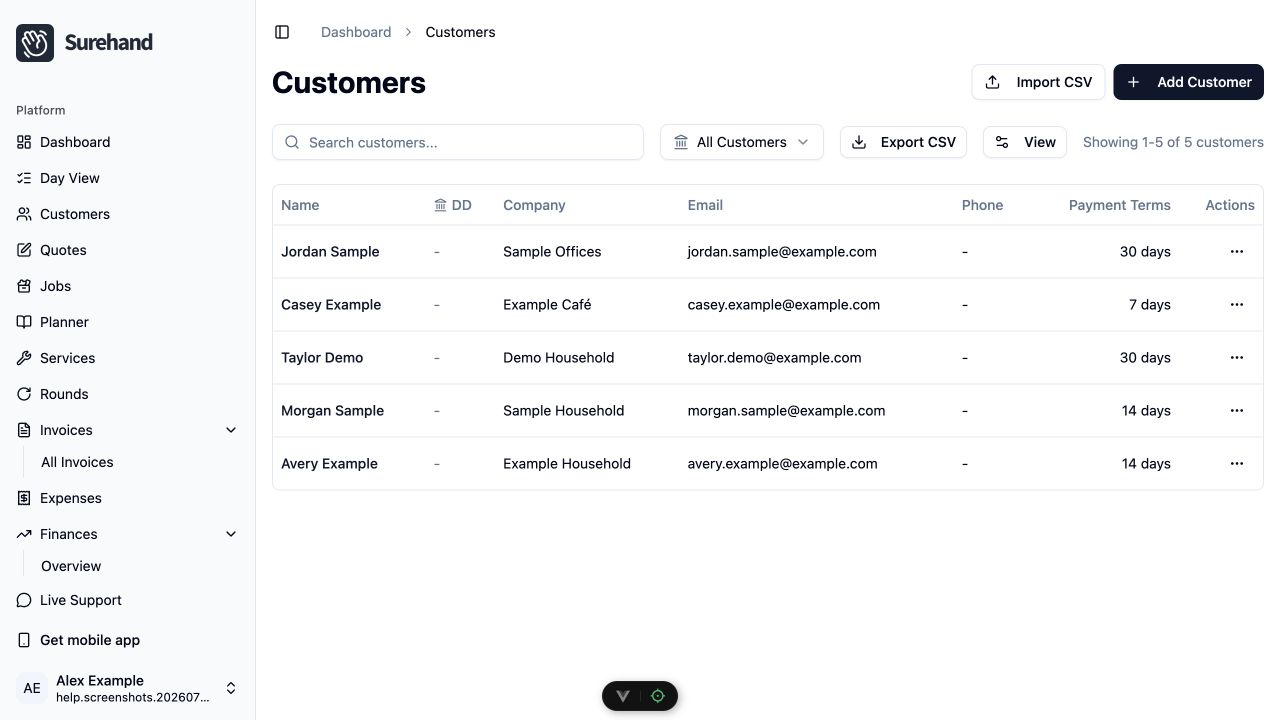
Customers and rounds have their own CSV exports. Other areas can provide CSV, JSON or report-specific downloads.
Some list exports contain the records currently loaded rather than every record in the organisation. Check pagination and totals before treating the file as complete.
Check what was exported
Confirm:
- Expected number of rows.
- Date range and filters.
- Names or identifiers needed to understand the records.
- Currency and date formats.
- Whether related information needs a separate export.
A customer export is not a substitute for invoice, payment, expense or tax-period records.
Keep exported data secure
Store exports securely, share them only with the intended recipient, and delete unnecessary copies. Avoid sending a full customer export when someone needs only a smaller report.
Financial access is restricted. If an export is unavailable, check your permissions and whether the current plan provides that feature.
If the export is empty
Check whether filters have hidden the records, whether you are in the correct organisation, whether the area contains data, and whether your account has the required access.